Small HVAC shop owners keep asking the same question: “What software should I use?” The answer depends on your size, your budget, and honestly, how tech-savvy your team is. Here’s our ranked list for 2026. We break this down further in HVAC Software for Startups vs Enterprise.
How We Ranked These
We didn’t run these through a scoring matrix. We ranked them based on vendor documentation, public pricing pages, published user reviews, and a simple question: if we were starting a small HVAC shop today, what would we use?
The criteria that actually matter for small shops:
- Can I afford it? (Under $300/month)
- Can my team learn it in a week? (If it takes longer, it won’t stick)
- Does it handle the daily workflow? (Schedule, dispatch, invoice, get paid)
- Does it make me look professional? (Customers notice)
#1 — Housecall Pro
Best for: 1-8 tech residential shops Price: $59-$299/month on annual billing (checked Oct 29, 2026, per Housecall Pro’s pricing page)
Housecall Pro wins the top spot because it nails the balance between features and simplicity better than anyone else. The scheduling is clean, the mobile app works, the automated customer texts are gold, and online booking drives real revenue.
Your tech gets a push notification with job details. Your customer gets a text saying “Mike is on his way, ETA 20 minutes” with Mike’s photo. You look like a professional operation even if you’re running three trucks out of your garage.
What we like most: The “on my way” text with tech photo. Sounds small, but customers feel informed and taken care of.
What we’d change: The price creep is real. Lock in annual pricing and be prepared to negotiate at renewal.
Real cost for a 4-tech crew: $149/month on Essentials (annual billing, up to 5 users).
#2 — Jobber
Best for: 1-15 person operations that want the best value Price: Core $29, Connect $99 per month on annual billing; higher tiers on Jobber’s pricing page
Jobber is neck-and-neck with Housecall Pro, and it wins on pricing for small crews: Connect at $99/month covers up to 5 users, versus $149/month for Housecall Pro Essentials. Check Jobber’s pricing page for what the higher tiers include and cost.
The quoting tool is genuinely better than Housecall Pro’s. If you send a lot of estimates — especially for install jobs — Jobber’s professional-looking proposals with optional line items help you close more work.
What we like most: Tier-based pricing with included users instead of per-tech fees. That removes some of the anxiety of growth increasing your software costs.
What we’d change: The mobile app needs to be faster. And offline mode needs to actually work for techs in basements and crawlspaces.
Real cost for a 4-tech crew: $99/month on Connect (annual billing, up to 5 users).
#3 — FieldPulse
Best for: 1-8 tech shops wanting a modern, clean interface Price: Not published (custom quote; see FieldPulse’s pricing page)
FieldPulse is the underdog that’s gaining ground fast. The interface is modern and clean, the scheduling is solid, and they’re shipping new features at a rapid pace. If you want something that feels current and doesn’t have the baggage of legacy decisions, FieldPulse is refreshing.
What we like most: The interface. It feels like software built in 2025, not software that’s been upgraded since 2015.
What we’d change: Less proven at scale. If you’re betting your business on software, track record matters.
Real cost for a 4-tech crew: Request a quote; FieldPulse uses seat-based custom pricing.
#4 — Service Fusion
Best for: Growing shops (5-15 techs) wanting unlimited users Price: Starter $208/month on annual billing, unlimited users (Service Fusion’s pricing page)
Service Fusion’s unlimited user model is perfect for shops that are hiring aggressively. You don’t think twice about adding another tech because the software cost doesn’t change. Features are solid — not as polished as HCP or Jobber, but complete.
What we like most: Unlimited users at a flat rate. Period.
What we’d change: The interface needs modernization and the mobile app needs work.
Real cost for a 4-tech crew: $208/month on Starter. Same for 14 techs, since users are unlimited.
#5 — Workiz
Best for: Shops that want built-in phone tracking Price: Not published (custom quote; see Workiz’s pricing page)
Workiz is interesting because of the integrated VoIP phone system. Your business phone, call tracking, and call recording are built into the same platform as scheduling and dispatch. For shops where phone leads are everything (that’s most HVAC shops), this integration is valuable.
What we like most: The phone integration. Knowing which Google ad generated which phone call without separate tracking software is huge.
What we’d change: Less HVAC-specific than we’d like. It’s more generalist.
Real cost for a 4-tech crew: Request a quote from Workiz.
What About the Big Names?
ServiceTitan: Not for small shops. It’s quote-only. If you’re under 10 techs, you’re likely overpaying. Save it for when you’re big enough to need it.
FieldEdge: Could work for shops with 5-8 techs who want pricebook management, but the quote-only pricing puts it in a gray zone. Worth a demo if flat-rate selling is central to your business.
Quick Decision Guide
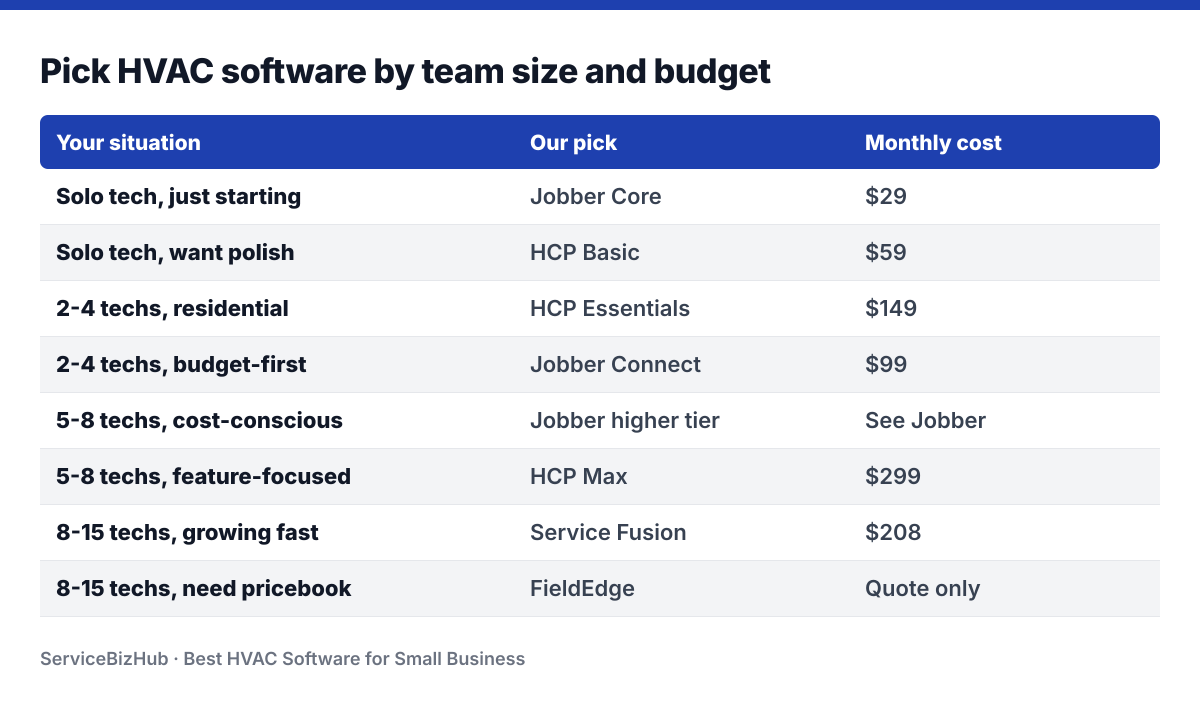
| Your Situation | Our Pick | Monthly Cost |
|---|---|---|
| Solo tech, just starting | Jobber Core | $29 |
| Solo tech, want polish | HCP Basic | $59 |
| 2-4 techs, residential | HCP Essentials | $149 |
| 2-4 techs, budget-first | Jobber Connect | $99 |
| 5-8 techs, cost-conscious | Jobber higher tier | See Jobber |
| 5-8 techs, feature-focused | HCP Max | $299 |
| 8-15 techs, growing fast | Service Fusion | $208 |
| 8-15 techs, need pricebook | FieldEdge | Quote only |
Stop Overthinking, Start Using
Here’s the truth that nobody in the software industry wants you to hear: for a small HVAC shop, any of these platforms will make you significantly more organized and professional than what you’re doing now. The difference between Housecall Pro and Jobber for a 3-tech crew is marginal. The difference between either of them and running your business from a notebook is massive. If you’re exploring this area, our Starting an HVAC Business? Here’s the Software guide covers it in detail.
Pick one. Sign up for the free trial today. Import your customer list. Schedule your jobs for next week. Send your first professional invoice. Request your first Google review.
In a month, you’ll wonder how you ever ran your business without it. In six months, the revenue from faster invoicing, fewer missed appointments, and more Google reviews will make the software cost feel like pocket change. Related: How to Get More Google Reviews for Your HVAC Business.
The best time to modernize was last year. The second best time is today.