This is the comparison that matters for most HVAC, plumbing, and electrical shops under 10 techs. Forget ServiceTitan for now — if you’re at this stage, your real decision is between these two. And to be honest, they’re more alike than either company wants you to think.
They’re 80% the Same Software
To save you some reading: both Housecall Pro and Jobber offer scheduling, dispatching, customer management, estimates/quotes, invoicing, payment processing, GPS tracking, a mobile app, and QuickBooks integration. The core workflow — book the job, send the tech, do the work, get paid — works essentially the same way in both platforms. Related: Housecall Pro Alternatives.
So why does the decision feel hard? Because the 20% that’s different hits different shops in different ways. Here is that 20%.
Where Housecall Pro Wins
Online Booking
Housecall Pro’s online booking widget is cleaner and more mature than Jobber’s. You embed it on your website, customers pick a date and service, and it drops into your schedule. This feature alone drives significant revenue for shops that implement it well. We break this down further in Housecall Pro Review.
Every booking that arrives through the website widget is a call your receptionist doesn’t have to answer, which is where much of the value comes from. (See Housecall Pro Pricing in 2026 for a deeper dive.)
Customer Communication
The automated “tech is on the way” texts with technician photo and ETA are gold. Customers love it. It reduces “where’s my tech?” calls by 90%. Jobber has similar features but Housecall Pro’s implementation is more polished and easier to set up.
Marketing Tools
Housecall Pro offers built-in email marketing, review request automation, and even a postcard mailing service. These are add-ons that cost extra, but having them integrated into the same platform is convenient. Jobber has review requests but fewer marketing tools overall.
Brand Recognition
More residential contractors use Housecall Pro than Jobber. This means more online resources, more YouTube tutorials, more Facebook group discussions, and more people who can help you troubleshoot. It’s a soft advantage but it matters when you’re stuck at 9pm trying to figure something out.
Where Jobber Wins
Quoting
Jobber’s estimate/quote builder is genuinely better. You can create professional-looking proposals with line items, optional add-ons, photos, notes, and terms. The “optional line items” feature lets customers choose upgrades when approving quotes — a built-in upselling mechanism.
Housecall Pro’s estimates are functional but more basic. If you send a lot of quotes (especially for install work), Jobber handles this better.
Multi-Day Jobs
If you do install work or jobs that span multiple visits, Jobber handles this more naturally than Housecall Pro. You can create a job with multiple visits, assign different team members to each visit, and track overall progress. Housecall Pro is more optimized for single-visit service calls.
Pricing at Scale
Both vendors price by plan with a set number of users included. As of Oct 29, 2026 (annual billing), per Jobber’s pricing page Core is $29/month for 1 user and Connect is $99/month for up to 5 users; per Housecall Pro’s pricing page, Basic is $59/month (1 user), Essentials is $149/month (5 users) and Max is $299/month (8 users, then $35/month per extra user). Jobber’s higher tiers are on its pricing page, so check their user limits and prices against Housecall Pro Max before deciding. At 1-5 users, Jobber’s published plans cost less. If you’re exploring this area, our ServiceTitan vs Housecall Pro guide covers it in detail.
Client Hub
Jobber’s client-facing portal lets customers request work, approve quotes, pay invoices, and view their service history. It’s particularly useful for property management clients who submit multiple work orders. Housecall Pro has a customer portal too, but Jobber’s is more developed.
Feature-by-Feature Comparison
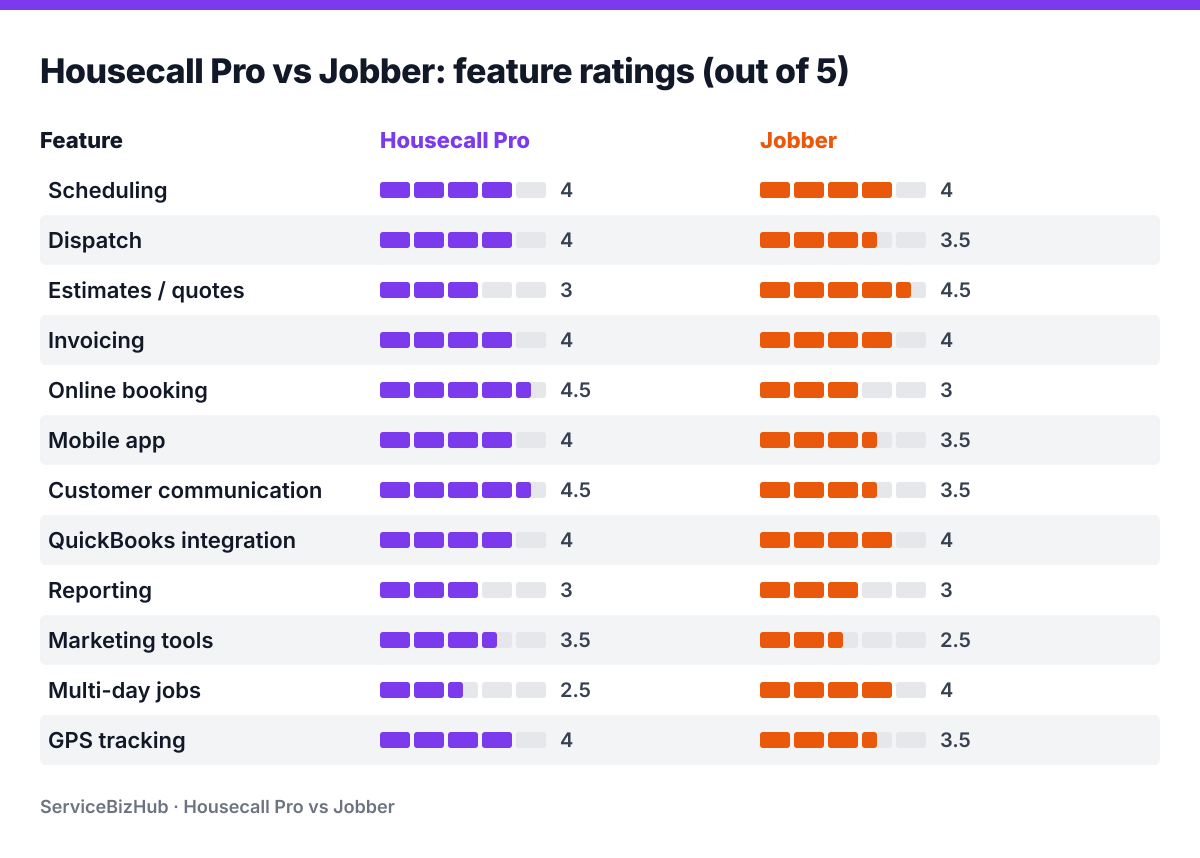
| Feature | Housecall Pro | Jobber |
|---|---|---|
| Scheduling | ⭐⭐⭐⭐ | ⭐⭐⭐⭐ |
| Dispatch | ⭐⭐⭐⭐ | ⭐⭐⭐½ |
| Estimates/Quotes | ⭐⭐⭐ | ⭐⭐⭐⭐½ |
| Invoicing | ⭐⭐⭐⭐ | ⭐⭐⭐⭐ |
| Online Booking | ⭐⭐⭐⭐½ | ⭐⭐⭐ |
| Mobile App | ⭐⭐⭐⭐ | ⭐⭐⭐½ |
| Customer Communication | ⭐⭐⭐⭐½ | ⭐⭐⭐½ |
| QuickBooks Integration | ⭐⭐⭐⭐ | ⭐⭐⭐⭐ |
| Reporting | ⭐⭐⭐ | ⭐⭐⭐ |
| Marketing Tools | ⭐⭐⭐½ | ⭐⭐½ |
| Multi-Day Jobs | ⭐⭐½ | ⭐⭐⭐⭐ |
| GPS Tracking | ⭐⭐⭐⭐ | ⭐⭐⭐½ |
How to Actually Decide
Here’s our decision framework. Answer these questions:
1. Do you send a lot of estimates and proposals? → Jobber. The quoting tool is noticeably better.
2. Is online booking important to you? → Housecall Pro. The booking widget is cleaner and drives real revenue.
3. Do you do mostly same-day service calls or multi-day projects? → Service calls: Housecall Pro. Multi-day: Jobber.
4. Are you growing past 8 techs? → Compare Jobber’s higher tiers (see its pricing page) with Housecall Pro Max, which includes 8 users and charges $35/month per extra user.
5. Is the “tech on the way” customer experience important to you? → Housecall Pro does this better out of the box.
If your answers split 50/50, go with Housecall Pro. The slightly larger user community and better online resources will serve you well when you need help.
Stop Overthinking It
Here’s the truth: you will be fine with either platform. Both are proven, both work, both have hundreds of thousands of users. The differences matter, but they’re differences of degree, not kind.
Pick the one that feels right when you do the free trial. Use it on real jobs for a week. Whichever one clicks with your workflow — that’s your answer.
The bigger mistake isn’t picking the “wrong” one between these two. The bigger mistake is spending six months researching instead of picking one and actually using it. Every week you run without proper software costs you more in lost efficiency, missed follow-ups, and unprofessional customer experience than the difference between these two platforms.
Sign up for both free trials today. Try each for a week. Commit to one by the end of the month. You’ll be glad you did.